Discounted Microfilm Scanning, Microfiche Scanning, Aperture Card Scanning, and Imaging Services

Author: G.I. Partners

US Libraries go Microfiche to Digital

A recent movement to convert microfiche to digital images will help local libraries across the nation in their efforts to get more information online. Records stored in a microfilm format is not a preferred method to use since finding information from microfilm is very time consuming. Historians and other genealogical researchers across the nation tell us that once they convert their microfiche to digital, the research time and accuracy have improved dramatically. Additionally, microfiche to digital is now fast and economical, making this process available to everyone.

You don’t have to know much about the process and procedure to convert your microfiche to digital format. Expert help is available at your fingertips. A microfiche to digital conversion is a highly skillful procedure that requires lots of experience to do it right. However, you can take advantage of years of experience from experts that have converted millions of records from microfiche to digital.

Another important aspect of a successful microfiche to digital conversion is the equipment used. There are a number of systems capable of converting your microfiche to digital but not all of these systems will yield the same results. To achieve a high degree of quality on a consistent basis, I recommend that only top quality microfiche to digital equipment be used. This equipment is very expensive so make sure you check with experts that will do this for you for a very cost effective price.

Continue Reading

Convert Microfiche

Although there are technically several ways to convert microfiche to PDF, TIFF, or JPEG, only one of them will deliver to you a high quality product, in a fast amount of time, at a low price. That method, of course, would be to send your microfiche to Generation Imaging in Florida via USPS, Fed-Ex, UPS, DHL, or via courier. But let us quickly go through the other methods to convert microfiche and see why they aren’t truly options:

  • Buy your own scanner. Sure you can get a ScanPro 2000 for a few thousand dollars. We have one of those- but we wouldn’t dare use them to convert microfiche for you. The reason why the ScanPro is inexpensive compared to the high production microfiche scanners is because the optics are poor for scanning microfiche; the high reduction ratio of microfiche (24x to 48x), lack of advanced quality filters, and rudimentary camera optics are all factors that are obstacles for creating a quality image. I didn’t even mention that you have to load one card at a time for the ScanPro. Although the ScanPro has its uses for other media, and it does come in handy for us for odd microform we may come across (it’s our business to receive all types of weird film) it’s not suitable for producing an acceptable quality to convert microfiche.
  • Buy high-end scanners. High production/high optics microfiche scanners (what Generation Imaging uses) can run you anywhere from $30,000 to $100,000 each depending on make and model. In addition to maintenance costs, you must consider training, managing labor, workflow, and technical support.
  • Flat-bed scanner. PC scanners are unable to convert microfiche (the magnification is too low).
  • Reader printer. Reader printers cost around $3000 to $8000. The manual labor is very time consuming to convert microfiche to digital image (one frame at a time).
  • Used scanners, used reader printers, etc. Although used scanning equipment sounds good on paper because the prices are cut by thousands of dollars, they don’t come with any warranties. When you consider that reader printers are known to break down and parts are needed, and the same can be said of microfiche scanners.

Ultimately, it is more cost effective and safer to allow Generation Imaging to convert microfiche for your project. You can plug the numbers yourself and weight the risk factors. If you have a small volume project which requires you to convert microfiche, it’s a no-brainer to use Generation Imaging.

how to convert microfiche

Continue Reading

Convert Microfiche vs Convert Microfilm

A mistake that occurs from clients or organizations who are not familiar with micrographics is mixing up microfiche and microfilm. Every industry or niche has its own lexicon, and in the micrographics industry there are major differences between microfiche and microfilm. The purpose of this article is to describe the differences between microfilm and microfiche.

Microfilm- It’s rolled.

In the most simplest terms, microfilm is rolled and microfiche is flat. Microfilm is also called roll film, and microfilm reels, microfilm rolls. Sometimes the width of the film is used to describe the types, such as 16mm roll film or 35mm microfilm.

Microfilm is usually stored in plastic or metal spools.  Some old microfilm is stored in metal pans. Yes, microfilm generally looks like small versions of movie reel film, except without the classic sprockets.

Microfilm cartridges look different that the standard reel spools- but only on the outside. The film is enclosed in a hard metal square casing to protect it. Kodak and 3M were innovators in producing microfilm cartridges.

There is no such thing as a 35mm roll film cartridge; there are only 16mm microfilm cartridges.

The actual microfilm frame placement and types vary, such as duplex film, positive, negative, duo, fixed, blipped, variable, etc, however that is a different topic and is unrelated to identifying microfilm vs microfiche.

Microfiche- It’s flat.

scan microfiche

A jacketed microfiche

Microfiche are flat “cards”, usually 4.13 x 5.83 inches, containing a few frames on them. Whereas a microfilm may hold 500 (35mm) to 20,000 frames (duplex), a microfiche card may hold as many one one frame to a couple of hundred (COM fiche).

Jacketed microfiche are simply roll film cut up into strips and inserted into plastic sleeves. Some people get confused if they don’t see the jacket sleeves, but it could be that the microfiche was duplicated. If it was duplicated, the copy may still have faint lines highlighting the border of the jackets. Since jackets are created from microfilm strips, they can come in the 16mm microfiche or 35mm microfiche varieties. A 16mm jacket has more rows and columns, and thus can hold more frames that a 35mm jacket (1-6 frames).

COM microfiche is computer generated and contain very small frames (usually with a 42x or 48x reduction ratio).

Step-and-repeat microfiche were created with a step-and-repeat camera. Many times they contain manuals or books and can hold hundreds of frames.

Continue Reading

Microfiche Scanning- How To Scan Microfiche

Microfiche scanning is the process of converting microfiche to digital images. Scanning microfiche and microfilm scanning are two of Generation Imaging’s main specialties- from quality to price, and to fun. As you could imagine, G.I. gets a lot of questions from callers and e-mails from potential clients that are new to the world of digital conversions. Also, many industries and organizations use different terminologies, so let me clear up some things up:

The difference between microfilm and microfiche is that fiche contain small images on flat sheets. Microfilm is roll film, usually spooled on a 16mm or 35mm or inside a Kodak or 3M cartridge. It gets kind of confusing for some people trying to identify media when they see cut strips of roll film inside clear plastic jackets. But the strong definition is that microfiche is contained on transparent flat sheets (around 4 inches x 6 inches, or 105 x 148 mm).

I used the word transparent for a reason; an image on an opaque sheet (like cardboard or index card) will only work if the material is has a cut-out rectangle. In that case, the “microfiche” is really an aperture card (an old PC card). The aperture card usually has a 35mm drawing, blueprint, or map in the cut-out. There are other scenarios where 16mm strips were cut and pasted in the rectangular cut-off. Either way, Generation Imaging can convert aperture cards to digital image.

There are a few different types of microfiche:

Jacketed microfiche (aka jacket fiche, jackets, jacket microfiche, microfiche jackets, jacketed microfilm sheets) generally contain around 5 rows of cut 16mm microfilm strips. However, 35mm jacketed microfiche have around up to 3 rows. Jacket fiche are perhaps the most varied type of microfiche: some only have a few frames on them, while others have around 60-90 images. Some jackets may contain unusual records, such as EKG, old school dot matrix computer printouts, or earthquake seismographs.

Jacket fiche can be duplicated, which ads to some people’s confusion when identifying microfiche. A diazo microfiche would not have physical sleeves anymore; instead you may see horizontal lines for each row.

digitize microfiche

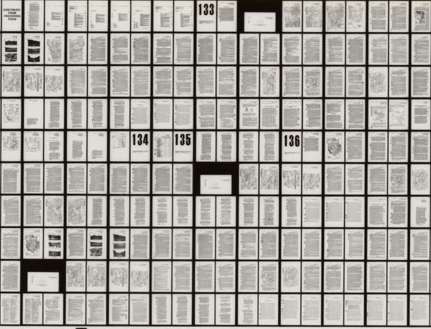
COM microfiche have been around for a long time. COM = Computer Output Media. These microfiche are computer generated and usually line up perfectly, in addition to having rows/columns or 16 x 13 or 18 x 15. Occasionally, not all the frames are filled with data, so there are blank spaces instead of a packed microfiche. COM fiche usually contain accounting records.microfiche scanning
Step-and-repeat microfiche were created with a special camera (also called 105mm film). They are more straight and even than jacket fiche. These microfiche have a varied image count, I’ve seen some have 100-300 images. They mostly contain manuals: airplanes, motorcycles, automobiles, jetski’s, scientific notebooks, etc.
microfiche conversion

Other rare types of microfiche include ultrafiche (350-500+ tiny images) and rewritable microfiche, sometimes called Microx or AB Dick microfiche.

Microfiche Scanning

Where Generation Imaging comes in is that G.I. Partners, LLC can convert microfiche to digital images, such as TIFF, PDF, or JPEG at a very low price. Microfiche scanning with NextScan scanners is a specialty of G.I. G.I. also has years of experience with microfiche scanning using Sunrise, Mekel, and Wicks & Wilson microfiche scanners, and has handled all types of microfiche scanning projects.

Continue Reading

Microfilm Scanning 2011

Microfilm Scanning

As 2010 heads to a close, Generation Imaging just wants to wish you Happy Holidays: Merry Christmas and Happy Chanukah. 2010 was a tough year for the economy and we hope all of our partners are hanging on and continue to be prosperous by making adjustments to adapt to this new economy. G.I. Partners, LLC stands ready to assist you with your microfilm scanning conversion as always, no matter if you are a hobbyist, reseller, or government agency. Generation Imaging has been very busy this year, meeting new clients and providing a top-notch microfilm scanning service to our loyal partners.

You can rest assured that your microfilm scanning conversion will be handled with the attention it deserves.
Some new clients may have uneasiness about sending out 16mm or 35mm rolls for the first time for microfilm scanning. However, we want to assure you that we have handled microfilm for decades and never damaged or lost any reels. Damian Hospital and Daniel Gandul have managed thousands of microfilm scanning projects over the years with no issues.

All of your rolls are logged into our microfilm scanning database. After we receive the 16mm or 35mm roll film, we compare the media to the provided log, if there is one. If there were any discrepancies between the provided log and our initial inventory, you would be notified immediately. Every department utilizes this database to update microfilm scanning information. Reports are generated to indicate the status and image count of each reel at any time during the production workflow. Scanner operators wear rubber gloves when handling film. Access is only given to authorized employees. Office requires our G.I. passcode to enter, and has security cameras.

Please feel free to call or e-mail Dan or Damian any day or time for a microfilm scanning quote or information about the microfilm scanning process.

Have a great holiday to close out 2010, and let’s hope 2011 continues to be good for all of us.
microfilm scanning services

Continue Reading